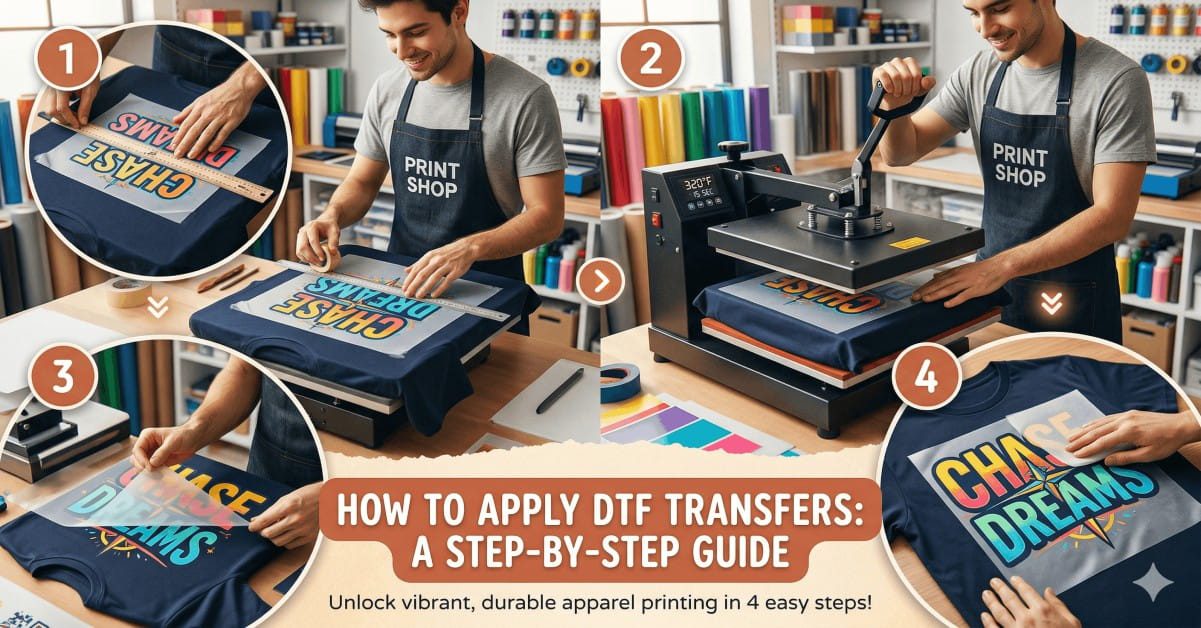
Hi, I am Shumail Ahmed. I work with DTF transfers every single day. I print them. I press them. I test them on real garments, not lab samples. If your DTF transfer is not adhering properly, you are not alone. This issue often comes up, even for people who already know the basics. The good news is simple. Most problems come from small steps that people skip or rush.
This guide explains those steps clearly. I will not overload you with theory. I will walk you through what actually works, based on real press work across the UK.
What “DTF Transfer Not Sticking” Really Means
When people say their transfer did not stick, they usually mean one of these:
- The DTF print peels off after cooling.
- The print lifts at the edges.
- The design cracks after the first wash
- The transfer looks fine, but comes off during wear.
All of these fall under DTF transfer bonding issues. The film printed fine. The press ran fine. But the bond between ink, adhesive, and fabric failed. To fix it, we need to check each stage in order.
Step One: Start With the Garment, Not the Transfer
Most people blame the transfer first. I check the fabric first.
Fabric Compatibility Matters More Than You Think
Not all fabrics react the same way to heat and adhesive. Fabric compatibility plays a significant role in the success of transfers.
DTF works best on:
- Cotton
- Cotton blends
- Polyester blends
Problems often appear on:
- Water-resistant fabrics
- Treated sportswear
- Thick fleece with loose fibres
If the garment feels coated or slippery, the adhesive may struggle to grip.
Do Not Skip Garment Surface Preparation
This step causes more DTF transfer application problems than any other.
Before pressing:
- Remove lint
- Remove dust
- Flatten seams and folds.
Use a lint roller or a light brush. Even small fibres block adhesive contact.
Watch for Moisture in Fabric
Moisture in fabric kills adhesion. Humidity, storage, or washing can add moisture without you noticing. Always do a pre-press step for 5 to 10 seconds. This dries the fabric and smooths the surface. Skipping this step often leads to heat transfer not sticking, even with perfect settings.
Heat Press Settings: Small Changes Make Big Differences
Most DTF transfer failures are due to press settings. Let’s break them down clearly.
Pressing Temperature Must Match the Film
Your pressing temperature should sit within the film supplier’s range. Most DTF films press between 145°C and 160°C.
Too low:
- Adhesive stays inactive
- Ink bonds weakly
Too high:
- Ink scorches
- Adhesive burns or hardens
If your DTF print is lifted after press, the temperature is often slightly low.
Pressure Level Must Be Firm and Even
Light pressure does not work for DTF. The pressure level must feel firm, not gentle.
Uneven pressure causes:
- Edge lifting
- Patchy bonding
Check your press with a pressure-test sheet, if possible.
Press Time Duration Controls Adhesive Flow
Most DTF transfers work best when you press them for 10 to 15 seconds. If the press time is too short, the adhesive does not melt fully and the transfer may fail to bond. If the press time is too long, the adhesive can dry out and lose its grip on the fabric. When you feel unsure, increase the press time by only two seconds, not ten, to avoid over-pressing.
Adhesive Powder Activation and Curing Process
This part matters even before the transfer reaches your press.
Adhesive Powder Activation Is Non-Negotiable
If the adhesive powder does not activate, nothing sticks. No press can fix that later.
Activated adhesive looks:
- Slightly glossy
- Even across the print
If it looks dull or grainy, activation failed.
The Curing Process Must Stay Controlled
During the curing process, heat should melt the powder, not bake it.
Too little heat:
- Weak bond
Too much heat:
- Brittle adhesive
I test the cure strength by gently flexing the film before pressing. It should bend, not crack.

Cold Peel vs Hot Peel: Follow the Film Rules
Peeling mistakes cause panic, but the fix is simple.
Know Your Peel Type
- A cold peel vs. a hot peel depends on the film type.
- Hot peel needs peeling while warm
- Cold peel needs complete cooling.
Peeling too early causes:
- Lifted ink
- Partial transfer
If unsure, wait until the film cools fully. Cold peel is safer when learning.
Second Press: The Step Many People Miss
After peeling, press again. Cover the design with parchment or Teflon. Press for 5 seconds.
This second press:
- Sets the adhesive
- Smooths edges
- Improves wash life
Skipping this step often leads to DTF print peeling off after washing.
Real Troubleshooting Scenarios I See Often
Scenario One: Edges Lift After Cooling
Cause:
- Low pressure
- No second press
Fix:
- Increase pressure
- Add finishing press
Scenario Two: Print Cracks After First Wash
Cause:
- Poor adhesive cure
- Low temperature
Fix:
- Check curing heat
- Raise the press temperature slightly.
Scenario Three: Transfer Looks Fine, Then Peels
Cause:
- Moist fabric
- No pre-press
Fix:
- Always pre-press
- Store garments dry
Transfer Quality Still Matters
Even perfect pressing cannot fix poor materials. If you use low-grade film or ink, bonding suffers. That is why we test every batch at Wisedtfprints.com before shipping. If you need consistent results, use tested materials like our DTF transfer shop, where films match press behaviour.
Choosing the Right Transfer Format for Your Work
Different jobs need different formats. For small logos or test runs, A4 and A3 sheets give control and reduce waste. For bulk work, rolls offer steady output. Many customers start with our DTF transfer shop to match the job type to the required size.
When Problems Keep Coming Back
If you checked:
- Fabric
- Heat press settings
- Adhesive cure
- Peel method
And issues still show up, the transfer source may be the problem. Cheap films save money upfront, but cost more when jobs fail. Reliable transfers reduce rework and returns. You can explore ready options through our DTF transfer collection or speak to us directly.
Final Advice From Real Press Work
DTF is forgiving, but only if you respect the process.
Every step links to the next:
- Garment prep
- Press setup
- Adhesive cure
- Peel timing
Skip one step, and problems follow.
If you take one thing from this guide, remember this. DTF transfers do not fail randomly. They fail for clear reasons. Fix the cause, and the print stays put. If you need tested transfers, guidance, or supplies, you can always visit Wisedtfprints.com to see how we support printers across the UK. I hope this guide saves you time, waste, and frustration.
Read more: DTF Transfer Care Guide for Customers
Frequently Asked Questions
Why does my DTF transfer stick in the centre but lift at the edges?
This usually points to uneven pressure or garment seams near the print area. Edge lifting often happens when the press does not apply equal force across the platen.
Can room temperature affect the adhesion of DTF transfer during pressing?
Yes. Cold workspaces slow adhesive flow, while high humidity adds moisture to garments. Both can weaken the bond if the pre-press step is skipped.
Is it normal for a DTF transfer to feel soft but still fail after washing?
Yes. A soft feel does not confirm complete bonding. If curing or press time is slightly low, the print may look fine, but lose grip after washing.
Should I adjust heat press settings when switching between garment types?
Always. Different fabrics hold heat differently. A setting that works on cotton may fail on blends or thick hoodies without minor adjustments.